Exchange 2019 End of Life: What Applies Since 14 October 2025
The Exchange 2019 end of life is already behind us: on 14 October 2025 Microsoft ended support for Exchange Server 2019. Anyone still running the version does so without regular support. For a mail server with an external connection this is a serious risk. This article shows what applies and which routes are open, including Exchange Server Subscription Edition. General advice on support dates is in Planning for end of support in Microsoft products.
The dates at a glance
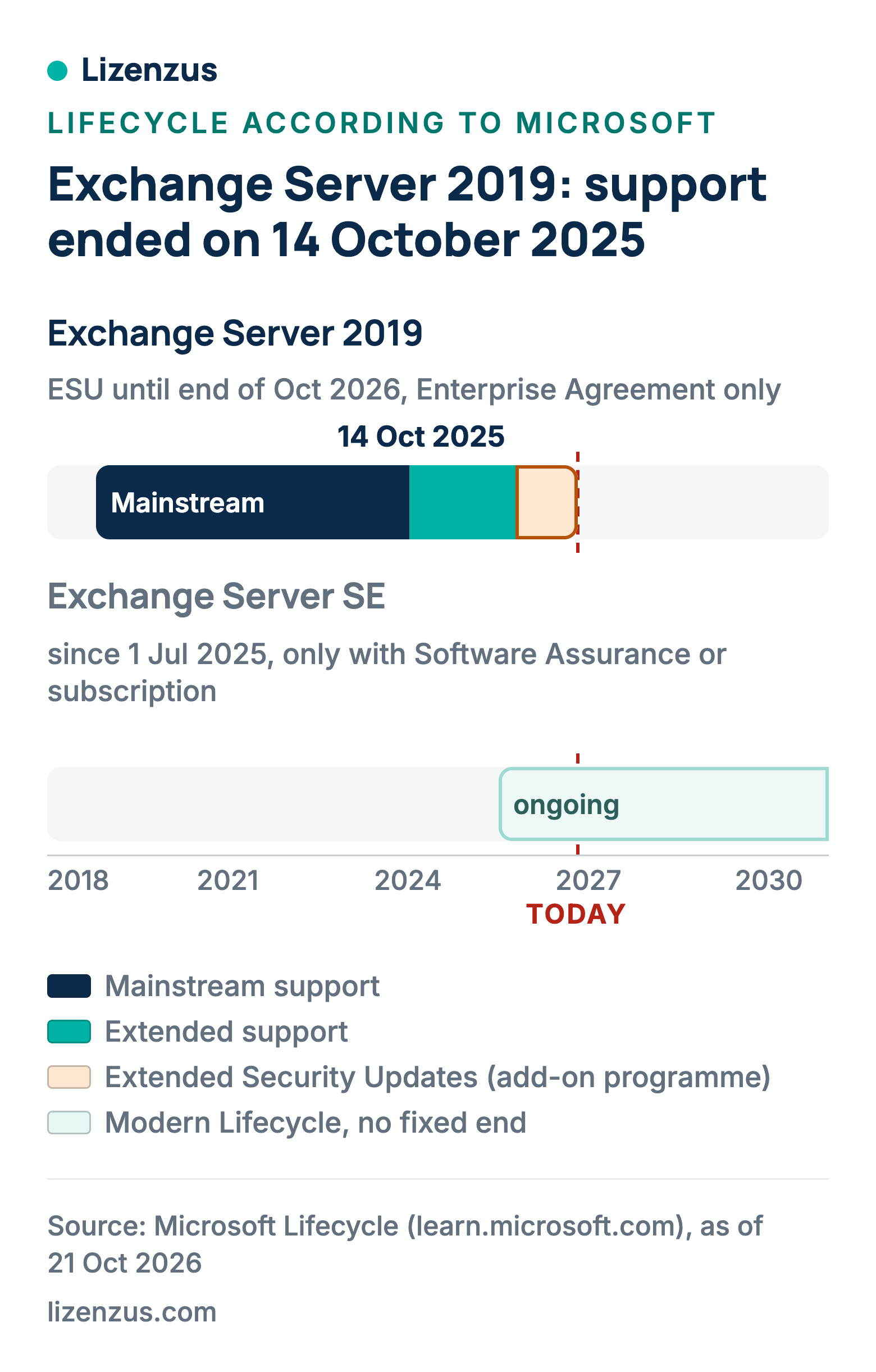
Exchange Server 2019 was released on 22 October 2018. Mainstream support ended on 09 January 2024, and end of support was on 14 October 2025. The successor, Exchange Server Subscription Edition (SE), has been available since 01 July 2025.
What applies after the end
The server keeps running, but new vulnerabilities are no longer fixed. A mail server is particularly exposed because of its connectivity. An isolated environment is only an option for it in exceptional cases, for example a purely internal mail system with no access from outside.
The ESU program ends in October 2026
Microsoft offered an Extended Security Update program for Exchange 2016 and 2019. It ran in two periods: period 1 from October 2025 to April 2026, period 2 from May to the end of October 2026. The conditions were narrow: the program was aimed at customers with an Enterprise Agreement, it was obtained through the Microsoft account team, and period 2 had to be purchased again. It did not extend the support lifecycle, and support cases were not possible. Microsoft has ruled out any further extension after October 2026.
Option 1: keep running it
Without updates every new vulnerability stays open. That is only defensible with additional protective measures and a documented risk decision. It is not suitable as a permanent solution.
Option 2: Exchange Server Subscription Edition
Microsoft recommends upgrading servers running Exchange 2019 CU14 or CU15 directly to SE. SE follows an ongoing lifecycle without a fixed end date.
Important for procurement: SE only runs with active Software Assurance or a qualifying cloud subscription. A perpetual license alone is not enough. Server licenses and CALs must carry Software Assurance unless you buy cloud subscriptions. How a lapse of Software Assurance affects existing rights to Exchange 2019 we leave open here. Clarify that with Microsoft or your contract partner before switching.
Option 3: a used perpetual license
A used, perpetual license does not replace Software Assurance. It therefore does not cover the route to SE. It is an option if you deliberately keep using Exchange 2019 or want to put an existing environment on a clean licensing footing. We point out the end of support to you beforehand.
Access licenses
For Exchange, too, the CAL must be at least the version of the server. For SE the Software Assurance condition applies to servers and CALs in addition. The logic of access licenses is explained in How many Windows Server CALs do I need?
Four questions before you decide
- Which level is your Exchange 2019 at: cumulative update 14 or 15?
- Can the server be reached from outside?
- Do you have active Software Assurance or a qualifying cloud subscription?
- How many server licenses and CALs are in use, and in which version?
The update level is the technical prerequisite for the direct route to SE, Software Assurance the licensing one. If either is missing, clarify that first.
Buying used: the legal framework
In its judgment C-128/11 of 03 July 2012 the Court of Justice of the European Union held that the distribution right in a computer program is exhausted once it has been sold with the right holder's consent. This also applies where the software was delivered by download. Whoever resells must make their own copy unusable. The first acquirer may not split up a client-server license that covers more users. How this can be evidenced in practice is described under Is used software legal?
What Lizenzus does for you
We supply used Exchange Server licenses and CALs with a documented chain of title and tell you the end-of-support date beforehand. If you are unsure which route fits your environment, describe it to us in a request. On SharePoint read SharePoint 2019 end of life.
Read more: Buy an Exchange Server license and Exchange Server 2019 Standard.
Where to read on
Three pages answer the questions that most often follow on from this article.
Legal position and evidence
Why trading in used volume licenses is lawful, where the limits lie and which four documents count in a license audit.
Purchasing basics
What a used license is, which forms are transferable and how to recognize an offer that stands up to scrutiny.
Public procurement
The procurement law framework, suggested wording for the specification and the documents for the procurement file.
A question about your specific case?
Describe your situation. You will receive an assessment and, if you wish, a quote.