Windows 10 End of Support for Organizations: ESU, LTSC and Windows 11
Published October 23, 2026 · Updated October 23, 2026
Windows 10 reached end of support on October 14, 2025, in every edition from Home to Enterprise. Organizations have three routes: move the PCs to Windows 11, buy Extended Security Updates (ESU) for up to three years, or run special-purpose devices on an LTSC version that follows its own lifecycle. This article brings together the dates for every Windows 10 variant, explains what ESU delivers and costs, which hardware Windows 11 requires, and how the move can be solved with used licenses for Windows 11 Pro and Enterprise.
Contents
- The dates: Windows 10, LTSC and Windows 11
- What has been missing since October 14, 2025
- Extended Security Updates: scope, requirements, price
- LTSC: a lifecycle of its own for special-purpose devices
- Windows 11: hardware, editions, servicing periods
- Licenses for the move: Pro, Enterprise, used
- The plan in five steps
- Frequently asked questions
The dates: Windows 10, LTSC and Windows 11
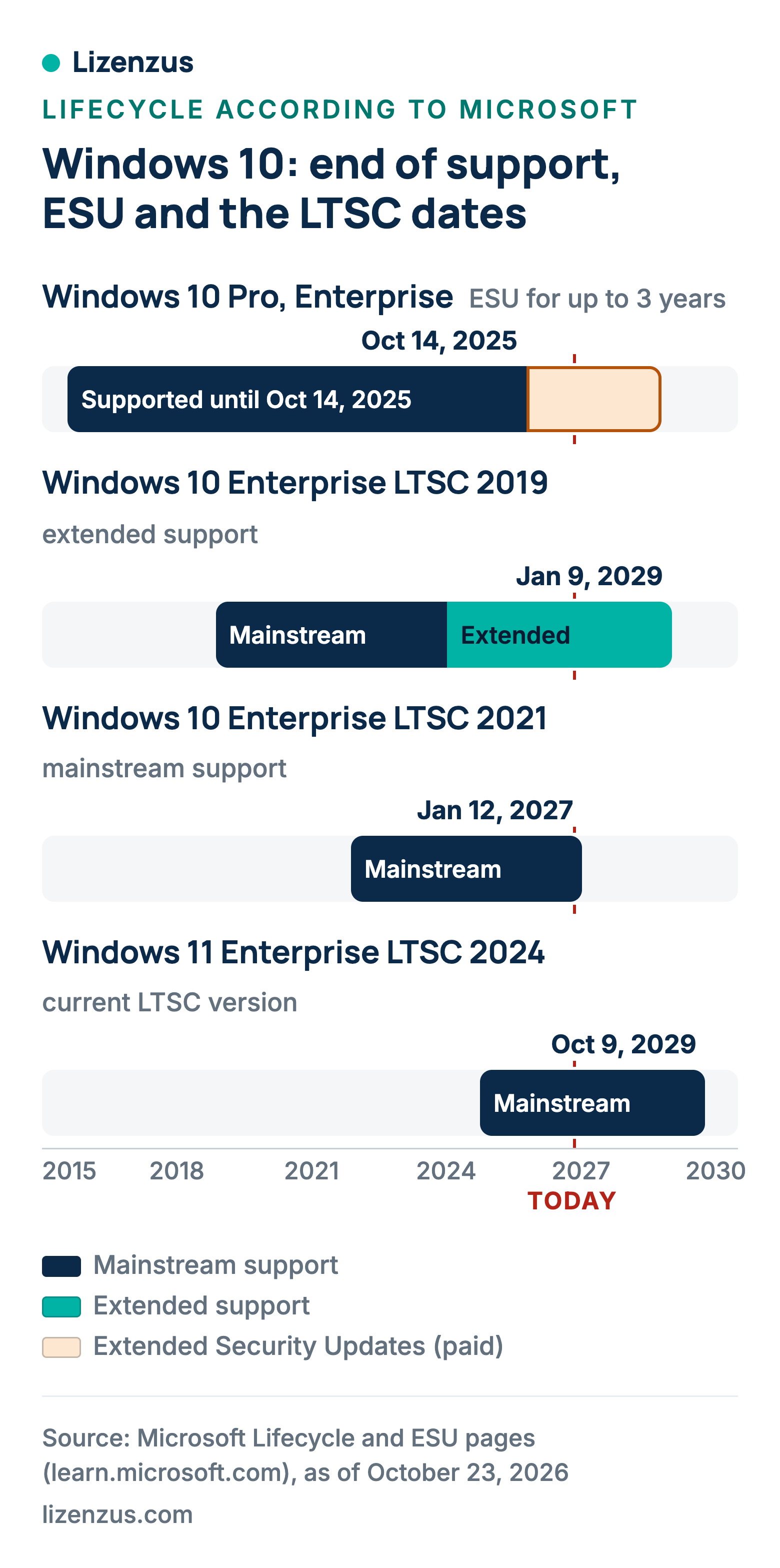
Microsoft lists Windows 10 Home and Pro, and Enterprise and Education, on separate lifecycle pages, both with the same end: October 14, 2025. Version 22H2 was the final version, and the October 2025 security update was the last regular update. The Long-Term Servicing versions (LTSB and LTSC), by contrast, follow their own dates and some of them run for years to come. Windows 11 is serviced in annual versions: 24 months per version for Home and Pro, 36 months for Enterprise and Education.
| Product | Support start | End of support | As of Oct 23, 2026 |
|---|---|---|---|
| Windows 10 Home, Pro, Enterprise, Education (22H2) | Jul 29, 2015 | Oct 14, 2025 | unsupported, ESU available |
| Windows 10 2016 LTSB | Aug 2, 2016 | Oct 13, 2026 | unsupported |
| Windows 10 Enterprise LTSC 2019 | Nov 13, 2018 | Jan 9, 2029 | extended support |
| Windows 10 Enterprise LTSC 2021 | Nov 16, 2021 | Jan 12, 2027 | mainstream support |
| Windows 10 IoT Enterprise LTSC 2021 | Nov 16, 2021 | Jan 13, 2032 | mainstream until Jan 12, 2027 |
| Windows 11 Home and Pro, version 25H2 | Sep 30, 2025 | Oct 12, 2027 | current |
| Windows 11 Enterprise and Education, version 25H2 | Sep 30, 2025 | Oct 10, 2028 | current |
| Windows 11 Enterprise LTSC 2024 | Oct 1, 2024 | Oct 9, 2029 | supported |
| Windows 11 IoT Enterprise LTSC 2024 | Oct 1, 2024 | Oct 10, 2034 | mainstream until Oct 9, 2029 |
On the dates: Microsoft's lifecycle tables show end dates as timestamps in Pacific Time, such as "10/15/2025 6:59:59 AM", that is, the last moment of the previous day in Redmond; in its text Microsoft says October 14, 2025. This article uses the day before the timestamp throughout. Windows 11 version 24H2 for Home and Pro already expired on October 13, 2026; for Enterprise and Education, 24H2 runs until October 12, 2027.
What has been missing since October 14, 2025
According to Microsoft, Windows 10 PCs continue to work. What has been missing since October 14, 2025 are three things: technical support, feature updates and quality updates, and the quality updates include the security and reliability fixes. A Windows 10 machine without ESU has received no fix for newly found vulnerabilities since the October 2025 update. Microsoft recommends upgrading eligible PCs to Windows 11.
For an organization this is not a technical problem but a risk problem: every workstation with internet access, mail attachments or outside USB sticks has been without protection against new vulnerabilities for a year. The decision which machines carry on under ESU, which move to Windows 11 and which stop altogether therefore belongs in this year, not the next.
Extended Security Updates: scope, requirements, price
According to Microsoft, ESU is a paid program that lets Windows 10 devices continue to receive security updates rated "critical" and "important" past the end of support date, as an annual subscription. Only those updates are included. Not included are new features, customer-requested non-security updates, design change requests and technical support; Microsoft helps only with issues that concern the ESU program itself.
| Item | Rule according to Microsoft |
|---|---|
| Term for organizations | a maximum of three years after end of support, bought by year; Year One starts in November 2025; the year-end dates in Microsoft's ESU FAQ: Oct 13, 2026, Oct 12, 2027, Oct 10, 2028 |
| Joining later | anyone buying in Year Two also pays for Year One, because ESU is cumulative |
| Price for organizations | 61 US dollars per device in Year One, doubling every consecutive year, for a maximum of three years; through the Volume Licensing program |
| Requirement | Windows 10 version 22H2 with update KB5066791 or later and the preparation package KB5072653 |
| Activation | per device with a Multiple Activation Key (MAK) from the Microsoft 365 admin center |
| At no additional cost | Windows 10 VMs in Windows 365, Azure Virtual Desktop, Azure virtual machines and Azure Dedicated Host; endpoints with a Windows 365 license for up to three years |
| Not covered | LTSB and LTSC versions, which have their own lifecycles |
| Consumers | separate program until October 12, 2027, one-time purchase of 30 US dollars or alternatives |
The arithmetic is simple and sobering. Three years of ESU cost 61, 122 and 244 US dollars per device, 427 US dollars in total, and at the end you have the same machine, still without Windows 11. Anyone who has to replace the hardware anyway pays twice with ESU. ESU suits devices that need to run for one or two more years and cannot be moved right now, say because of a line-of-business application or a certification; for the fleet as a whole, Windows 11 is the shorter calculation. Microsoft states the prices in US dollars only.
LTSC: a lifecycle of its own for special-purpose devices
The Long-Term Servicing versions of Windows 10 are not affected by the end of support on October 14, 2025. Windows 10 Enterprise LTSC 2021 runs until January 12, 2027, LTSC 2019 until January 9, 2029, and the IoT variant of LTSC 2021 even until January 13, 2032; only the old 2016 LTSB expired on October 13, 2026. Under the LTSC servicing model, according to Microsoft, devices receive only monthly quality updates and no feature updates. Microsoft expressly does not intend LTSC for most or all PCs in an organization, but for special-purpose devices and environments that must run unchanged for years: control computers, test benches, tills, medical devices.
For such devices, LTSC is the quietest route: Windows 10 Enterprise LTSC 2021 carries you to the start of 2027, Windows 11 Enterprise LTSC 2024 to October 9, 2029 and the IoT variant to 2034. What LTSC means for Office, and why the combination of Windows LTSC and Office LTSC 2024 is built for isolated networks, is explained in Office LTSC 2024 explained.
Windows 11: hardware, editions, servicing periods
According to Microsoft, Windows 11 requires a compatible 64-bit processor with at least 1 GHz and two cores, 4 GB of memory, 64 GB of storage, UEFI firmware with Secure Boot and a Trusted Platform Module version 2.0. A direct upgrade requires Windows 10 version 2004 or later with the September 14, 2021 security update or later. Whether a machine meets the requirements is therefore mostly a question of age: processor and TPM 2.0 are the two points where older devices fail.
The servicing period depends on the edition. Each annual version of Windows 11 is serviced for 24 months for Home and Pro and for 36 months for Enterprise and Education. Version 25H2 of September 30, 2025 therefore runs until October 12, 2027 for Pro and until October 10, 2028 for Enterprise. Anyone who wants to avoid feature updates takes Windows 11 Enterprise LTSC 2024 with a fixed end on October 9, 2029. An organization on Pro must therefore move to the next version every two years, on Enterprise every three.
Licenses for the move: Pro, Enterprise, used
There are two license routes for the move. Windows 11 Pro is the base license that comes with the device or is bought as a stand-alone license. Windows 11 Enterprise is an upgrade on top of it: Microsoft's guide to deploying Enterprise licenses names a supported and licensed version of Windows Pro as the requirement for subscription activation of Windows Enterprise E3 and E5; a version of Windows Pro that is out of support does not support this activation. A Windows 10 Pro device without ESU has therefore not been a valid base for an Enterprise subscription since October 14, 2025.
Used volume licenses close that gap. Under Section 69c No. 3 of the German Copyright Act, which implements Article 4(2) of Directive 2009/24/EC, the distribution right in a copy of a program sold in the EU or EEA with the rights holder's consent is exhausted; the buyer may therefore resell a perpetual license. For Windows this means that Windows 11 Pro, Windows 11 Enterprise and Windows 11 Enterprise LTSC 2024 are available as used perpetual licenses with the three documents on first sale, the previous owner's declaration and the chain of ownership. What separates a volume agreement from a single license is explained in What is a volume license?, the transfer rules in Transferring a Microsoft license.
The plan in five steps
- Measure the fleet: per device the Windows version and edition, processor, TPM version, firmware mode and the line-of-business applications that depend on it.
- Form three groups: devices that meet Windows 11 (upgrade), devices with a special task (LTSC) and devices that must run unchanged for one or two more years (ESU).
- Book ESU now, not later: ESU is cumulative; anyone joining in Year Two pays for Year One as well. The requirement is 22H2 with KB5066791 and KB5072653.
- Obtain the licenses: Windows 11 Pro or Enterprise per device, LTSC 2024 for special-purpose devices; used, with the three documents.
- Record the dates: Pro versions end after 24 months, Enterprise after 36, LTSC 2024 on October 9, 2029. Anyone who keeps the dates in the license register never runs into a second end of support by accident; the overview of all Microsoft dates is in Planning for Microsoft end of support.
Frequently asked questions
Can I keep using my PC with Windows 10?
Yes, according to Microsoft the machine continues to work. Since October 14, 2025, however, there has been no technical support, no feature updates and no quality updates, so no security fixes either, except through ESU.
How long will Windows 10 still get updates?
Regular updates ended on October 14, 2025. With ESU, organizations receive security updates for up to three more years, until October 10, 2028 at the latest according to Microsoft's ESU FAQ; consumers until October 12, 2027. LTSC versions follow their own schedule: LTSC 2021 until January 12, 2027, LTSC 2019 until January 9, 2029, IoT Enterprise LTSC 2021 until January 13, 2032.
What does Windows 10 ESU cost?
For organizations, 61 US dollars per device in Year One, doubling every year for a maximum of three years, through the Volume Licensing program. Consumers pay a one-time 30 US dollars or use the alternatives Microsoft names. Microsoft gives no euro prices.
How do I get Windows 10 ESU?
Organizations buy ESU licenses through volume licensing, obtain the Multiple Activation Key from the Microsoft 365 admin center and activate each device with it. The device must be on version 22H2 with KB5066791 and the preparation package KB5072653.
Is Windows 10 with ESU still secure?
ESU delivers only the security updates rated "critical" and "important", no new features and no technical support. Microsoft gives no security rating; ESU is a bridge, not a replacement for Windows 11.
What does LTSC mean for Windows 11?
Long-Term Servicing Channel: devices receive only monthly quality updates and no feature updates. Windows 11 Enterprise LTSC 2024 runs until October 9, 2029, the IoT variant until October 10, 2034. Microsoft intends LTSC for special-purpose devices, not for most PCs.
Do I have to buy a new computer for Windows 11?
Only if the existing one does not meet the requirements: a 64-bit processor with 1 GHz and two cores, 4 GB of RAM, 64 GB of storage, UEFI with Secure Boot and TPM 2.0. Eligible Windows 10 devices from version 2004 onwards can be upgraded directly.
What Lizenzus does for you
We supply used perpetual licenses for Windows 11 Pro, Windows 11 Enterprise and Windows 11 Enterprise LTSC 2024, and for special-purpose devices also Windows 10 Enterprise LTSC 2021, each with the three documents on first sale in the EEA, the previous owner's declaration and the chain of ownership. In your quote request, tell us the number of devices per group; the request is non-binding.
Sources
- Microsoft Learn: Windows 10 Home and Pro, lifecycle and Windows 10 Enterprise and Education, lifecycle, accessed October 23, 2026
- Microsoft Learn: lifecycle pages Windows 10 Enterprise LTSC 2021, LTSC 2019, 2016 LTSB and IoT Enterprise LTSC 2021, accessed October 23, 2026
- Microsoft Learn: Extended Security Updates for Windows 10, Enable Extended Security Updates and Lifecycle FAQ, Extended Security Updates, accessed October 23, 2026
- Microsoft: Windows 10 Extended Security Updates for consumers, accessed October 23, 2026
- Microsoft Learn: Windows 11 requirements, accessed October 23, 2026
- Microsoft Learn: Windows 11 release information and Windows 10 release information, accessed October 23, 2026
- Microsoft Learn: lifecycle pages Windows 11 Home and Pro, Windows 11 Enterprise and Education, Windows 11 Enterprise LTSC 2024 and IoT Enterprise LTSC 2024, accessed October 23, 2026
- Microsoft Learn: Windows Enterprise LTSC overview, accessed October 23, 2026
- Microsoft Learn: Deploy Windows Enterprise licenses, accessed October 23, 2026
- Official Journal of the EU: Directive 2009/24/EC, Article 4(2)
- Section 69c German Copyright Act (UrhG)
Where to read on
Three pages answer the questions that most often follow on from this article.
Legal position and evidence
Why trading in used volume licenses is lawful, where the limits lie and which four documents count in a license audit.
Purchasing basics
What a used license is, which forms are transferable and how to recognize an offer that stands up to scrutiny.
Public procurement
The procurement law framework, suggested wording for the specification and the documents for the procurement file.
A question about your specific case?
Describe your situation. You will receive an assessment and, if you wish, a quote.