Windows Server 2025 End of Life: Dates and 2022 Versus 2025
Published October 23, 2026 · Updated October 23, 2026
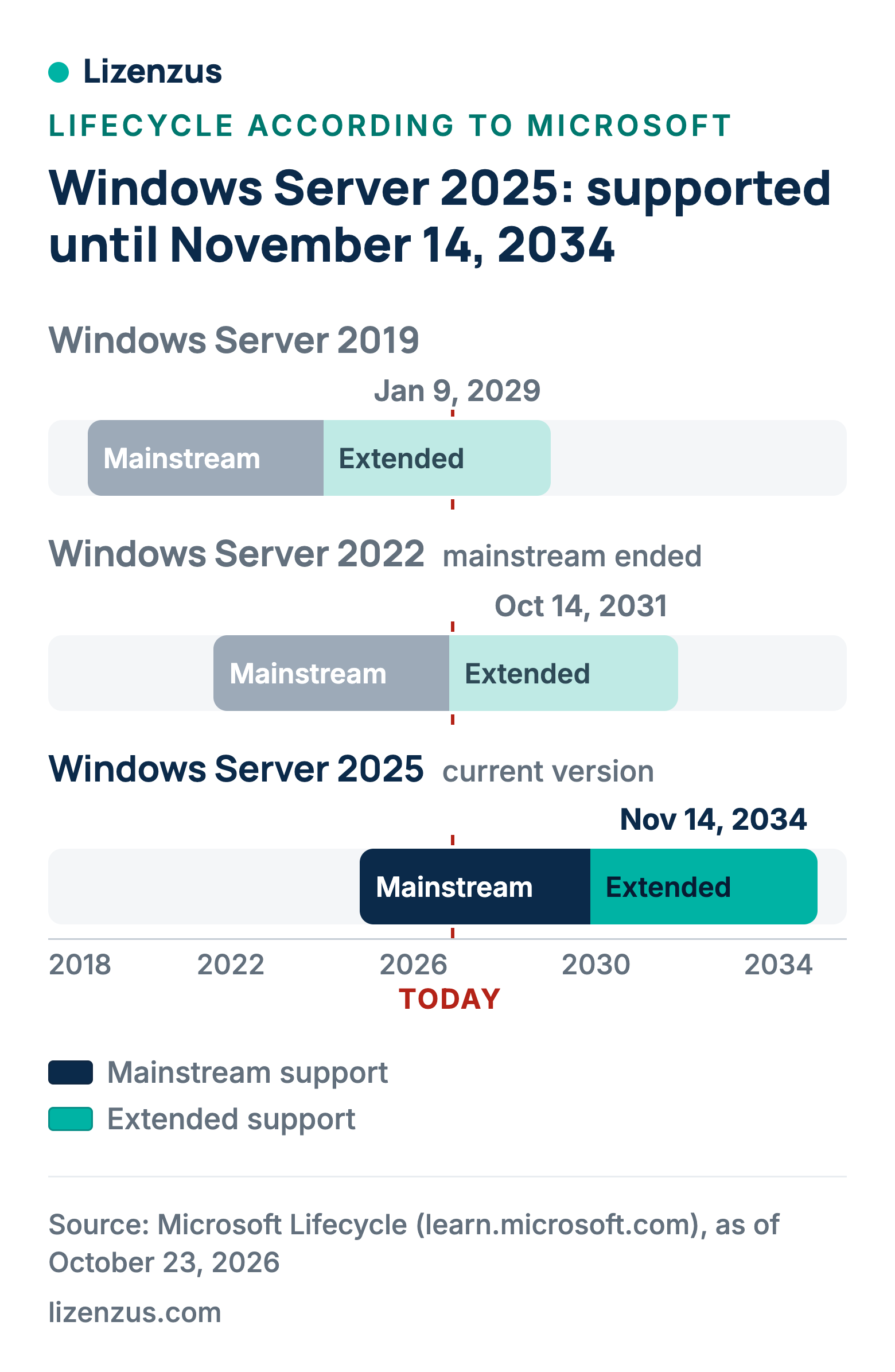
Windows Server 2025 is supported until November 14, 2034: mainstream support ends on November 13, 2029, followed by five years of extended support with security updates. That is about three years more than Windows Server 2022, whose support ends on October 14, 2031. Anyone choosing between 2022 and 2025 today is therefore deciding mainly about the remaining support period, plus hotpatching, the new upgrade rules and the hardware requirements. This article puts both versions side by side.
Contents
- Windows Server 2025 key dates
- What mainstream and extended support include
- Windows Server 2022 versus 2025
- Upgrade paths to 2025
- Extended Security Updates: where things stand
- Stay on 2022 or choose 2025?
- What the choice means for the license
- Frequently asked questions
Windows Server 2025 key dates
According to Microsoft, Windows Server 2025 follows the Fixed Lifecycle Policy, meaning fixed end dates for two support phases. The lifecycle page gives the start date as November 1, 2024 and shows the end dates as timestamps at 6:59 AM Pacific Time on November 14, 2029 and November 15, 2034. The date that matters for planning is the day before, the last day with support:
| Phase | Date |
|---|---|
| Release | Nov 1, 2024 |
| End of mainstream support | Nov 13, 2029 |
| End of extended support | Nov 14, 2034 |
The dates apply to the Datacenter, Datacenter: Azure Edition, Essentials and Standard editions. How to plan such dates across all Microsoft products is covered in Planning for Microsoft end of support.
What mainstream and extended support include
The Fixed Lifecycle Policy provides a minimum of five years of mainstream support, followed for some products by a period of extended support. According to Microsoft, Windows Server in the Long-Term Servicing Channel gets a minimum of ten years: five years of mainstream support and five years of extended support, which includes regular security updates.
| Service | Mainstream | Extended | After that |
|---|---|---|---|
| Security updates | yes | yes, at no additional cost | only through ESU |
| Non-security updates | yes | no | no |
| Requests for design changes and new features | yes | no | no |
| Paid support | yes | yes | no |
For 2025 this means: until November 13, 2029 you get everything; until November 14, 2034 you still get security updates and paid support. Bugs without a security impact stay unfixed from late 2029, and new features appear only in successor versions.
Windows Server 2022 versus 2025
Both versions run in the Long-Term Servicing Channel, in which Microsoft typically releases a new major version every two to three years. The differences that matter for purchase and operation:
| Feature | Windows Server 2022 | Windows Server 2025 |
|---|---|---|
| Release | Aug 18, 2021 | Nov 1, 2024 |
| End of mainstream support | Oct 13, 2026 (ended) | Nov 13, 2029 |
| End of extended support | Oct 14, 2031 | Nov 14, 2034 |
| Hotpatching (updates without restart) | Datacenter: Azure Edition only | Standard and Datacenter through Azure Arc |
| SMB over QUIC | Azure Edition only | Standard and Datacenter |
| Active Directory database pages | 8k | 8k or optional 32k |
| In-place upgrade across | up to 2 versions | up to 4 versions |
| Subscription through Azure Arc (pay-as-you-go) | not listed | yes |
| Minimum RAM, Server Core | 1 GB | 2 GB |
| Processor | 1.4 GHz, 64-bit | 1.4 GHz, 64-bit, SSE4.2 and POPCNT |
Core licensing is structured the same way in both versions (at least 8 core licenses per processor, 16 per server, Standard with two operating system environments, Datacenter unlimited). The details are in Windows Server 2025 licensing. On the technical side, Microsoft also names optimized NVMe performance, GPU partitioning in Hyper-V and delegated managed service accounts for 2025; the overview of new features still lists Hotpatch through Azure Arc as a preview, while the Hotpatch page lists it as available at no extra cost.
Upgrade paths to 2025
Microsoft relaxed the upgrade rule with 2025. Starting with Windows Server 2025, nonclustered systems can upgrade up to four versions at a time; up to Windows Server 2022 it was two. According to Microsoft's table, a direct in-place upgrade from installation media is possible from Windows Server 2012 R2, 2016, 2019 and 2022, but not from Windows Server 2012 without R2. Through Windows Update, the upgrade works from 2019 and 2022 once the required cumulative update is installed.
| Starting version | From media to 2025 | Through Windows Update to 2025 |
|---|---|---|
| Windows Server 2012 | no | no |
| Windows Server 2012 R2 | yes | no |
| Windows Server 2016 | yes | no |
| Windows Server 2019 | yes | yes |
| Windows Server 2022 | yes | yes |
Two rules remain: unlike Windows client, each Windows Server upgrade requires a separate license. And the edition is kept during an upgrade; changing from Standard to Datacenter is allowed, from Datacenter to Standard it is not.
Extended Security Updates: where things stand
Extended Security Updates (ESU) are paid security updates for critical and important vulnerabilities after the end of extended support, for up to three years according to Microsoft; they do not extend the product's lifecycle. As of October 23, 2026, Microsoft's ESU overview lists only Windows Server 2012 and 2012 R2, whose ESU ended on October 13, 2026. For Windows Server 2016, Microsoft has announced an ESU program through January 2030; details are in Windows Server 2016 end of life. For 2019, 2022 and 2025 the ESU pages say nothing; Microsoft only states there that Extended Security Updates will be distributed if and when available.
So do not plan on ESU for 2022 or 2025. Extended support until 2031 and 2034 respectively is the deadline that counts.
Stay on 2022 or choose 2025?
Three questions lead to the decision, all drawn from the tables above:
- How long should the server run? Beyond October 14, 2031, only 2025 is an option, with support until November 14, 2034. Until 2031, 2022 is enough, although its mainstream support has already ended.
- Do your applications support 2025? If a vendor still requires 2022, stay on 2022 or buy 2025 and use the downgrade right (see below).
- Does the hardware meet the requirements? 2025 requires processors with SSE4.2 and POPCNT and 2 GB of RAM for Server Core; according to Microsoft, 32 GB of storage is the absolute minimum, and a TPM 2.0 is needed only for certain features such as BitLocker.
Rule of thumb: new servers, and servers that should still be running after October 2031, get 2025. Existing 2022 servers keep running until 2031 and move with the next hardware refresh. Anyone buying 2022 new today is buying just under five years of security updates without further bug fixes, because mainstream support ended on October 13, 2026. The decision questions for running 2022 servers in detail are in Windows Server 2022 end of life.
What the choice means for the license
A license for Windows Server 2025 is the more flexible choice because it covers both versions: with downgrade rights, Microsoft allows you to run earlier versions of the same edition instead of 2025, provided you have the installation media and keys. A 2022 license, on the other hand, does not cover running 2025; that would require an upgrade with its own license. The same direction applies to access licenses: a Windows Server 2025 CAL permits access to Server 2025, 2022, 2019 and 2016, a 2022 CAL does not permit access to 2025. How to count CALs is explained in Windows Server CAL: user or device CAL.
Both versions are available as used, perpetual licenses. Resale is lawful in the EU under Article 4(2) of Directive 2009/24/EC if the license was first sold in the Union with the rights holder's consent; the Court of Justice of the European Union confirmed this in case C-128/11 and requires the previous owner to make their copy unusable. Which documents belong with a used license is explained in Is used software legal?
Frequently asked questions
When does support for Windows Server 2025 end?
Mainstream support ends on November 13, 2029, extended support on November 14, 2034. Microsoft's lifecycle page shows the timestamps on the following day at 6:59 AM Pacific Time.
Is Windows Server 2022 obsolete?
No, but its mainstream support ended on October 13, 2026. Until October 14, 2031, Microsoft delivers security updates; bugs without a security impact are no longer fixed.
Can I upgrade Windows Server 2022 to 2025?
Yes, from installation media or through Windows Update with the required cumulative update. The upgrade requires its own license for 2025.
Can I upgrade from Windows Server 2012 to 2025?
From 2012 R2, yes, directly from installation media. For Windows Server 2012 without R2, Microsoft's table lists no direct upgrade.
Are there Extended Security Updates for Windows Server 2025?
Not announced as of October 23, 2026. Microsoft's ESU pages list no program for 2019, 2022 or 2025; plan with the end of extended support on November 14, 2034.
Is buying Windows Server 2022 still worthwhile today?
If the server will be replaced by October 2031 at the latest or an application requires 2022, yes. For longer periods, 2025 is the better choice; with the downgrade right, a 2025 license also covers running 2022.
What is the most important technical difference?
Hotpatching: on 2025 Standard and Datacenter, security updates can be installed through Azure Arc without a restart; on 2022 only in the Azure Edition. Add SMB over QUIC in all editions and the optional 32k page size in Active Directory.
What Lizenzus does for you
We supply used licenses for Windows Server 2025 Standard, Windows Server 2025 Datacenter and Windows Server 2022 Standard with matching CALs, each with proof of first sale in the EEA, the previous owner's declaration and the chain of ownership. The overview is at Windows Server licenses. In your quote request, tell us the planned service life, the cores per server and the number of users and devices. Your quote request is non-binding.
Sources
- Microsoft Learn: Windows Server 2025 lifecycle, accessed October 23, 2026
- Microsoft Learn: Windows Server 2022 lifecycle, accessed October 23, 2026
- Microsoft Learn: Windows Server 2019 lifecycle, accessed October 23, 2026
- Microsoft Learn: Fixed Lifecycle Policy, accessed October 23, 2026
- Microsoft Learn: Lifecycle FAQ Extended Security Updates, accessed October 23, 2026
- Microsoft Learn: Extended Security Updates overview, accessed October 23, 2026
- Microsoft Learn: Install, upgrade, or migrate to Windows Server, accessed October 23, 2026
- Microsoft Learn: What's new in Windows Server 2025, accessed October 23, 2026
- Microsoft Learn: Hotpatch for Windows Server, accessed October 23, 2026
- Microsoft Learn: Hardware requirements for Windows Server, accessed October 23, 2026
- Microsoft Learn: Windows Server servicing channels, accessed October 23, 2026
- Microsoft Licensing: Windows Server 2025 licensing guidance, accessed October 23, 2026
- Official Journal of the EU: Directive 2009/24/EC, Article 4(2)
- Court of Justice of the EU, judgment of July 3, 2012, C-128/11 UsedSoft, paragraphs 70 and 77
Where to read on
Three pages answer the questions that most often follow on from this article.
Legal position and evidence
Why trading in used volume licenses is lawful, where the limits lie and which four documents count in a license audit.
Purchasing basics
What a used license is, which forms are transferable and how to recognize an offer that stands up to scrutiny.
Public procurement
The procurement law framework, suggested wording for the specification and the documents for the procurement file.
A question about your specific case?
Describe your situation. You will receive an assessment and, if you wish, a quote.